
The Overview page shows your inventory, plan and team at a glance, with the inspections that need your attention. To open it, select Overview at the top of the menu in the web app.
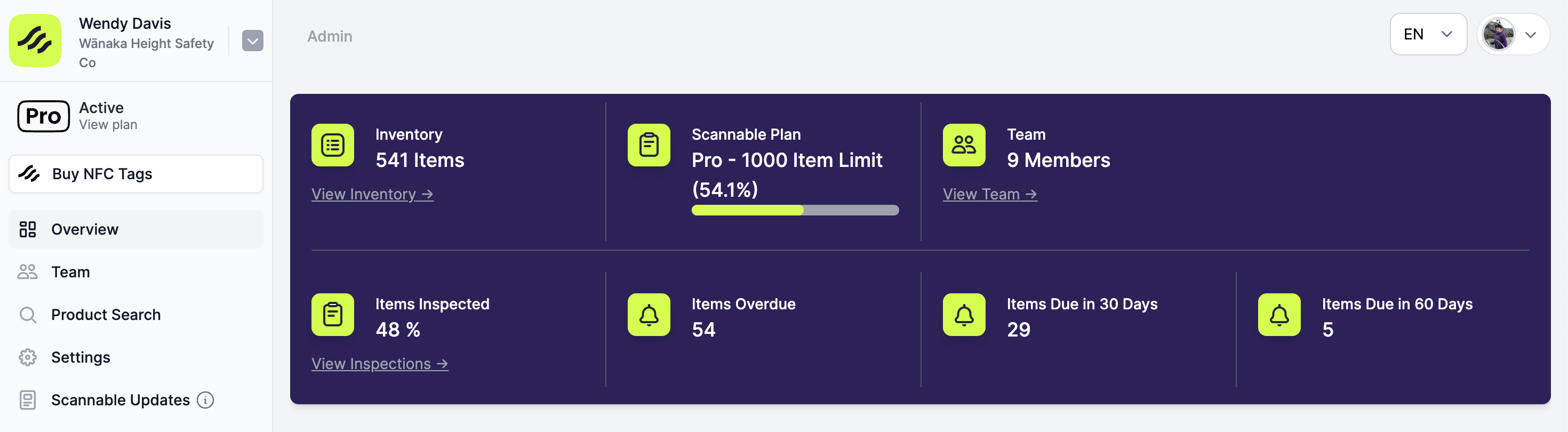
The Overview page is in the web app only.
What each figure means
| Figure | What it shows | Link |
|---|---|---|
| Inventory | How many items are in your inventory. | View inventory opens all your items. |
| Scannable Pro | Your plan's item limit, with a bar showing how much of it you use. | None |
| Team | How many members your organisation has. | View team opens Team. |
| Items inspected | The percentage of your items that have been inspected at least once. | View inspections opens Inspections. |
| Items overdue | Items whose next inspection date has passed. | View overdue items opens your inventory, filtered. |
| Items due in 30 days | Items with an inspection due in the next 30 days. | View opens your inventory, filtered. |
| Items due in 60 days | Items with an inspection due in the next 60 days, including those above. | View opens your inventory, filtered. |
Overdue items are not counted as due in 30 or 60 days. To plan ahead, see Using inventory filters.
The team and inspection figures can take up to 30 seconds to catch up after a change.
If you don't have a paid plan
The panel also shows a Learn more about Scannable Pro here link. Once you reach your item limit, an Upgrade Today button appears beside it. See Inventory limits.
Reports you can download
- Download inventory reports: a PDF or CSV of any inventory view, including each item's latest inspection.
- Report by folder: a PDF or CSV of one folder.
- Recording thorough examinations: a certificate of thorough examination.